Resolve unresponsive with interlaced timelines

I might have posted this problem a while ago already, but Im wondering if anyone has found a solution.

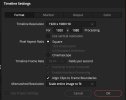
Issue: when timeline settings are set to 'enable interlace processing', I'm experiencing freezes in the Resolve interface, quite randomly. I can't figure out what causes it, other then the 'enable interlace processing' option, on the same system I never had that issue with progressive timelines.

Keyboard shortcuts like spacebar or J-K-L are completely unresponsive during a freeze. My only 'solution' is to tap play backward and forward on the Mini panel, untill somehow Resolve starts playing the timeline normally again.

Things I've already tried are moving the media to a faster storage or rebooting Resolve. It doesn't help.

Anyone else encountered this and has any ideas to share?
 
This may not work for you, depends on what you are doing, but I always try and work progressively but use the 50i monitoring option. It depends on your material of course. I very rarely work with truly interlaced footage now despite most of my deliveries being HD and delivered as interlaced files. This all works fine unless there is a credit roller, which have to be interlaced in the UK for commissioned deliveries. When I do have a roller I render out a progressive QT of the programme, copy the contents of my sequence in to a sequence set up with interlaced processing and put the roller at the end.
 
Thanks Michael for your input.

Unfortunately I do need to with interlaced footage in an interlaced timeline for interlaced delivery, sometimes.
 
Issue: when timeline settings are set to 'enable interlace processing', I'm experiencing freezes in the Resolve interface, quite randomly. I can't figure out what causes it, other then the 'enable interlace processing' option, on the same system I never had that issue with progressive timelines.

Keyboard shortcuts like spacebar or J-K-L are completely unresponsive during a freeze. My only 'solution' is to tap play backward and forward on the Mini panel, untill somehow Resolve starts playing the timeline normally again.
What source drive are you using (disk I/O and formatting)? We find Resolve fairly responsively with an SSD RAID, if you can put one together. Which specific version of Resolve are you using, and which OS?
 
I might have posted this problem a while ago already, but Im wondering if anyone has found a solution.

Issue: when timeline settings are set to 'enable interlace processing', I'm experiencing freezes in the Resolve interface, quite randomly. I can't figure out what causes it, other then the 'enable interlace processing' option, on the same system I never had that issue with progressive timelines.

Keyboard shortcuts like spacebar or J-K-L are completely unresponsive during a freeze. My only 'solution' is to tap play backward and forward on the Mini panel, untill somehow Resolve starts playing the timeline normally again.

Things I've already tried are moving the media to a faster storage or rebooting Resolve. It doesn't help.

Anyone else encountered this and has any ideas to share?
Pepijn,

I have had similar issues with the Resolve interface freezing up as well as timeline playback stopping. I discovered the problem was a result of the cache which I had forgotten was on thereby causing Resolve to not release the interface until the timeline was fully cached.

Resolve has many different levels of cache which can be confusing.

Cache items to check:

1- Do any or all of the clips in the timeline either in the edit page or color page have "Render Cache Fusion output or Render Cache color output" activated?

2- In the playback menu is the Render Cache set to None, Smart or User.

If set to none the cache should not be activating. When I am grading I have the cache set to User or None until I decide I need to render the particular clip.

If after checking the items above the problem continues consider deleted all the project render cache with the "Render Cache" set to None to prevent the cache from restarting after the delete? Once the project render cache has been deleted quit Resolve then reboot. After all the project render cache is deleted will the timeline play in real time with "Render Cache" set to None?

Is your cache rendering to the same hard drive or SSD where the camera footage is located or is the render cache destination a separate HD or SSD?

What is the project resolution setting? Does the timeline match the project resolution and interlaced frame rate? Resolve 18 allows timelines to independently override the project resolution and frame rate settings so verify all match.
 
Last edited:
Pepijn,

I have had similar issues with the Resolve interface freezing up as well as timeline playback stopping. I discovered the problem was a result of the cache which I had forgotten was on thereby causing Resolve to not release the interface until the timeline was fully cached.

Resolve has many different levels of cache which can be confusing.

Cache items to check:

1- Do any or all of the clips in the timeline either in the edit page or color page have "Render Cache Fusion output or Render Cache color output" activated?

2- In the playback menu is the Render Cache set to None, Smart or User.

If set to none the cache should not be activating. When I am grading I have the cache set to User or None until I decide I need to render the particular clip.

If after checking the items above the problem continues consider deleted all the project render cache with the "Render Cache" set to None to prevent the cache from restarting after the delete? Once the project render cache has been deleted quit Resolve then reboot. After all the project render cache is deleted will the timeline play in real time with "Render Cache" set to None?

Is your cache rendering to the same hard drive or SSD where the camera footage is located or is the render cache destination a separate HD or SSD?

What is the project resolution setting? Does the timeline match the project resolution and interlaced frame rate? Resolve 18 allows timelines to independently override the project resolution and frame rate settings so verify all match.
Thanks, but I'm not using any kind of cache when these freezes occur, it really has to do with the timeline option 'enable interlace processing'.
 
This issue I have noticed first time when Resolve give us native interlace processing in v17.

Lhttps://liftgammagain.com/forum/index.php?threads/resolve-ui-constantly-going-unresponsive.17466/#post-167051
I have this behavior since version 17 when native interlace processing has been announced.
This UI hangs occure only in interlace timeline.
I have found that my mini panel still work when UI hang.
I can jump to next, prev shot, color knobs, and wheels work. To "unhang" resolve I press combination of play,reverse, play, reverse, reverse. play.... on mini and hit spacebar on keyboard to stop. After few try it work for me.
I raport that to BM since v.17.
Pepijn can you confirm my observation?

This is not cache or disk speed problem. I have raid6 storage with 1400 Mb/s. Problem only in interlace.

Does "Align to frame boundary" on or off make any difference?

Jef
This problem existed before "Align frame boundry" function was added to Resolve and do not change anything in this case.
To "unhang" resolve I press combination of play,reverse, play, reverse, reverse. play.... on mini and hit spacebar on keyboard to stop. After few try it work for me.
Switching video monitoring from 1080i50 to 1080psf 25 can help with hanging Resolve BUT this is not solution loose ability to view interlace material.

-Maciek
 
This issue I have noticed first time when Resolve give us native interlace processing in v17.

Lhttps://liftgammagain.com/forum/index.php?threads/resolve-ui-constantly-going-unresponsive.17466/#post-167051


This is not cache or disk speed problem. I have raid6 storage with 1400 Mb/s. Problem only in interlace.


This problem existed before "Align frame boundry" function was added to Resolve and do not change anything in this case.

Switching video monitoring from 1080i50 to 1080psf 25 can help with hanging Resolve BUT this is not solution loose ability to view interlace material.

-Maciek
Yes Maciek, it is exactly the problem you described earlier. I'll switch monitor to psf, see if that helps.
 
Sounds a little like under resourced system.
Does the system perform well in progressive with 50p source and 50fps timeline?
Hi Peter,

it is not the case because I have 1080p50 project, timeline with noise reduction (2 pass + SNR) in real time.
This problem appeared in version DRS 17.
I have raported it on BMD forum but no response.

Thanks,
Maciek
 
Hi Pepijn.
I also still have some native interlaced projects to work with.
My workaround, as strange as it may seem, was to switch the video playback panel from 12bit to 10bit in the project settings. If not, in an interlaced project, my system would even crash.
Give it a try and let us know.
 
Hi Pepijn.
I also still have some native interlaced projects to work with.
My workaround, as strange as it may seem, was to switch the video playback panel from 12bit to 10bit in the project settings. If not, in an interlaced project, my system would even crash.
Give it a try and let us know.
Sorry to revive this thread so late. But I'm still facing the exact same issue, even many Resolve versions later; Resolve interface becomes unresponsive in an interlaced timeline.

To answer Rui; I have tried 12bit but as soon as I press play Resolve crashes. So I keep using 10-bit.

Let's this issue gets some attention from BMD. It's not hardware related, it happens to me on each and every system I have worked on so far.
 
Back
Top